





So, after you've logged into your WeddingWire Community account, you stumble upon a discussion that strikes your fancy & you wish to become a part of that discussion by leaving a comment etc. We'll show you exactly how you can participate in a discussion using your desktop.
_________________________________________________________________
Desktop
There are three different places where you can write your comment, and they all work in a similar manner, so choose whichever strikes your fancy the most and start commenting where you wish.
1. Reply Tab at the Top of the Discussion
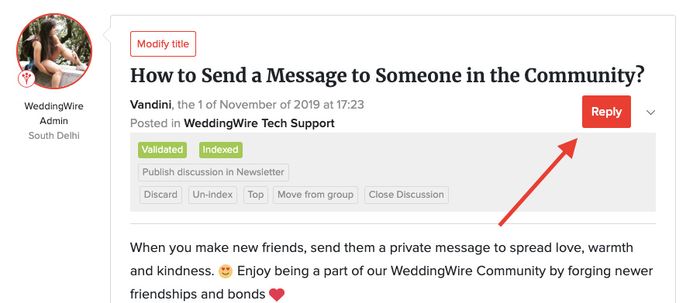
This is the first tab using which you can post a reply on a particular discussion.
2. Reply Tab Right Underneath The Posted Discussion
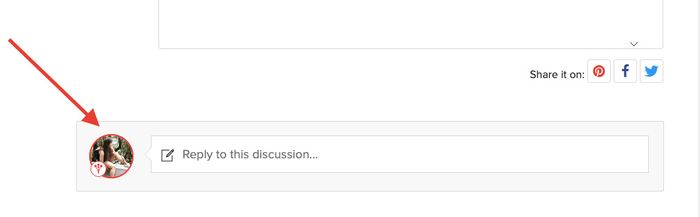
This is the second tab using which you can post a reply on a particular discussion.
3. Reply Tab at the Bottom of the Discussion
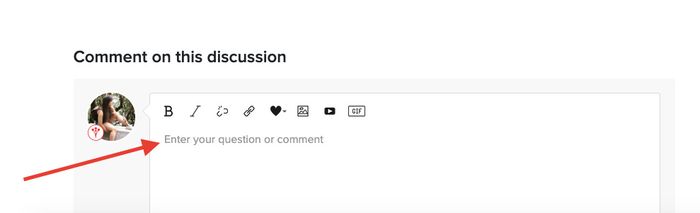
This is the third tab using which you can post a reply on a particular discussion.
You are open to using either of these THREE options to type out your reply and leave it on the discussion of your choice.
Where Do You See Your Comments After Posting Them?
Your comment will go to the top of the list of comments because it's the most recent.
How to Reply to a Comment on a Discussion? How to Send a Reply to Another Member on a Discussion?
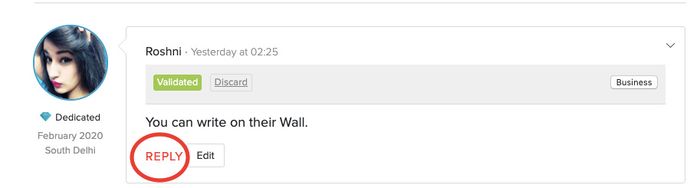
If you want to reply directly to something another Community member said & notify them that you replied to their comment, then you can click on the reply icon on that particular comment.
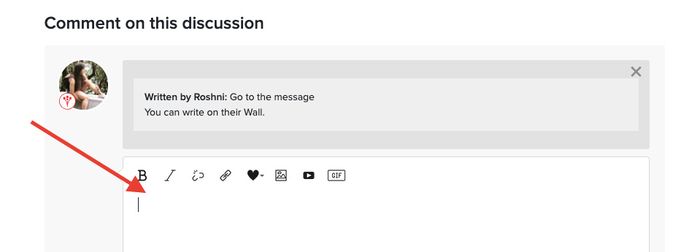
A comment here box will pop up and then all you need to do is type your reply and click on reply.
__________________________________________________________________
And that is how, my friends, you join in discussions and become an active member of the WeddingWire Community!
Want to dive in and learn how to send friend requests or send a personal message to your friends on the Community? Well read these out and get chatting now!